Today’s YouTubers are repeating the mistakes of yesterday’s bloggers

I watch a ton of YouTube, on the order of an hour or two each day and I can honestly say the no-ads premium family account on YouTube is one of the best bargains on the internet for everyone in my house.

Lately, YouTube creators are going through a reckoning, and I think it’s unfortunate to see some creators I’ve come to know and trust over the years squander their work as they chase percentage points of revenue instead of focusing on the craft.

It reminds me a lot of how blogging changed around 2005-2009, when ad money came pouring in, and while it was great for bloggers that previously were just publishing for the heck of it (myself included), eventually the money tainted the process as many people rushed to improve their bottom line, often at the expense of whole reason they created their sites.

YouTube has had money attached for much longer than blogging, and larger channels producing weekly videos are often an operation with 4-5 people offscreen that are never mentioned doing much of the editing legwork. So they run much more like a small business with staff that needs to be paid and a monthly burn rate. Any changes YouTube makes to revenue structures tends to derail these small businesses.

Like blogging, YouTube is vague about how much money anyone makes off the platform but there seems to be a relationship between number of views and number of subscribers as well as the time each person spends watching videos as well as publishing frequency, but nothing is concrete and the numbers change frequently so people tend to get together and share notes on forums and try and read the tea leaves, much like the entire world of SEO on websites and blogs to try and optimize their revenue and production (usually at the expense of user experience of their readers).

I don’t seek out this information, but it seems like the prevailing wisdom from a few years ago was that you should make your videos around ten minutes long to make the most money, and as soon as I heard this, I realized about 90% of creators I follow on YouTube put out a 10-12 minute video each week. Once you see it, you can’t unsee it, as everyone followed the conventional wisdom.

But then YouTube introduced a copy of TikTok/Instagram Reels called Shorts and they started paying people much more if they used this new weird vertical video format that doesn’t quite work well with YouTube apps or the YouTube site, but the money dragged all the biggest channels into it.

Subscribers started complaining that they didn’t want notifications on “a new video!” only to find it was a re-edited old ten minute video, truncated to 30 seconds long, and creators often respond that it was a great way to get new subscribers and they’d continue to do it (because: new revenue).

There’s been a slew of popular creators leaving YouTube and quitting completely, as their ad rates and conventional wisdom were no longer supporting large editing teams behind the scenes and it reminds me of the blogging world once advertising became the biggest source of revenue.

An old ad company I worked with on my own blogs started making ever weirder requests of my sites after a couple years of simple money-for-ads exchanges. They’d say things like “hey, if you introduced a new blog or an entire category of your site to Gaming, we could give you a huge contract with a gaming company” and I would tell them I’m not interested in gaming, but I would see some other popular blogs launch new gaming-only offshoots and knew they were taking the bait.

Advertising on blogs started as simple banner ads along the side, but increasingly morphed into basically companies asking bloggers to endorse their product directly in ads, with photos of the bloggers and a big quote about how great the product was. Getting a check in the mail for displaying an ad banner saying “drink more Ovaltine” was one thing, but eventually the money ran out on those simple ads and people wanting to be paid as much as they used to had to create their own ad copy and get professional headshots so ads on your site could proclaim that you, the author/owner love Ovaltine so much that it has changed your life and all your readers should try it out.

I see the same trend happening on YouTube. Creators chase whatever the current rules of thumb are, and lately people are obsessed with making one to two hour long videos because a few creators that only release a handful of very long videos each year were making a lot of money when millions of people were watching 2 hours of their videos, slurping up ads every ten minutes.

So a lot of channels I follow are obsessed with “long videos = new money” so they’re often reformatting a dozen of their weekly 10 minute videos into 1.5-2 hour long compilations, and like with YouTube Shorts before, subscribers aren’t happy to see a new video notification only to find out it’s a bunch of 2 year old videos they’ve already seen but in a new wrapper.

How does it end?

Eventually, the blogging ad market changed so much that if you were consistently making money with blogging your site had to morph and change drastically to fit the needs of advertisers, not your readers. And you tend to lose lots of readers in the process, as your site strays so far from its original intentions.

YouTube is here to stay for the long haul, and popular creators on the platform will continue to create videos and hopefully find ways to be compensated for it, but it sure feels like there are a lot of parallels between the heyday of blogging and current YouTube reckoning from creators.

My hope for YouTube creators is much like bloggers. Don’t spend all your time chasing the tea leaves and conventional wisdom. Focus on your channel/site and keep creating things you love that will resonate with your viewers/readers. Hopefully the money will follow, but obsessing over how to eke out every last cent from your work will make your work suffer.

Move fast with broken things

Today I got an instagram comment on a very old photo, so I popped over to see it was spam and deleted it. But then I noticed I linked to my cousin by name in the photo, and he died unexpectedly a few years ago, so I went to his profile to check it out. Nothing since he shocked everyone just before covid hit by going to take a nap and never waking up, despite being in fairly good shape and only in his 50s (a later autopsy revealed he had late stage lung cancer that was undiagnosed).

From his instagram, I followed a link to his Facebook profile, and since he didn’t have much of a web presence, pretty much all his time was spent on Facebook. I expected to see his profile frozen in amber but strangely, on his birthday each year in early June, there were dozens of jubilant happy birthday comments from his Facebook friends. Scrolling back, you see the same pattern every year in June, dozens of people shouting happy birthday with happy emoji and GIFs and images.

If you scroll back far enough, you see his first post-mortem birthday is more somber, as people say they miss him, and a few posts before that is photos from his memorial.

I know Facebook has “this user has died” features, but it’s tough to prove to Facebook and if I remember correctly you have to contact a certain team and share a death certificate and published newspaper obits.

I’ve worked on social networks before and you don’t want to accidentally mark a living person as deceased, but it sure does suck when the flip side of that situation happens thousands of times. I used to have an old online friend that Facebook would dutifully remind me of his birthday every year for over 10 years after his death.

My cousin worked in Hollywood as a prop master and knew hundreds of people from film and TV, and it’s clear from the euphoric birthday posts his old contacts might not know he passed away four years ago. Facebook keeps pushing notifications on others, and I’m sure the recipients thought huh, I haven’t heard from him in years, I might as well push this button to post something nice so he knows I’m thinking of him.

It’s weird Facebook keeps doing this to his profile each year. It’s quite likely his account hasn’t logged into anything since shortly after his memorial service when someone in the family posted photos and flyers from the event. And I get why Facebook would pressure users into feeling some serious FOMO, about how you’re missing dozens of notifications and you really should come back to Facebook to check back in.

But it sucks seeing this reminder every year from well-intentioned people that probably just don’t know he died years ago. I wish Facebook was better about these kinds of sensitive issues.

Apple Card/Goldman Sachs scam attempt

Today I got a call from a legit looking number: 877-255-5923 and since I was parked in my car, I had time to google it while on the call to see it was the Apple Card Goldman Sachs official phone number.

A guy on the line said he was in the fraud department at Goldman Sachs and wanted to run three charges past me they recently denied. They were absurd things in the UK and so I said I didn’t make them. Then he said his manager would come online shortly to complete the fraud investigation.

The funny thing is, I’ve been called by the Apple Card department at Goldman Sachs before, but it was only after I tried to buy something online and got denied, or I saw a weird denied charge in my phone as a notification first. There was nothing today like that, and I received no emails from Apple Card services today.

The manager came on and since I’ve been phished and scammed before over a phone call from what appeared to be my own bank, I knew to give out zero sensitive information on the phone, instead insisting that I call back the real number back to make sure it was actually Goldman Sachs. The manager asked my name, which was a giant red flag that they didn’t have my information handy already. After a bit of explanation, he eventually asked me to verify my card by saying the three character code on the back. I wasn’t going to give him this information and said I was driving a car and would call back shortly, and asked if I should use the return number? He said yes and promptly hung up on me. Another red flag, they’re usually pretty accommodating when it’s a real call.

The funny thing is, half the google results for that Apple Card phone number are people on reddit talking about how it seems like a scam, like you’re being tossed around a call center’s boiler room somewhere. The call lacked all the normal trappings of a real bank call, like a statement that you’re on a recorded line, and all the associated financial/legal disclaimers. There was also some background noise that made it sound unprofessional compared to the times I’ve actually heard from Goldman Sachs via phone.

As I’ve learned in the past, it’s easy to fake what phone number a call appears to originate from, to make it look like they’re calling from a legitimate company’s official number. But as I’ve learned before, you never give out any information or do anything related to your finances from a phone call you didn’t initiate yourself because their identity is impossible to verify.

Always ask for a call back number and always search google immediately after the call to make sure the number is real. Ask for any case numbers associated with the call, so you can reconnect to someone if it’s a real call you just received. Any real bank or credit card company will oblige and let you call back to verify you’re talking to your real financial institution.

Be safe out there, everyone.

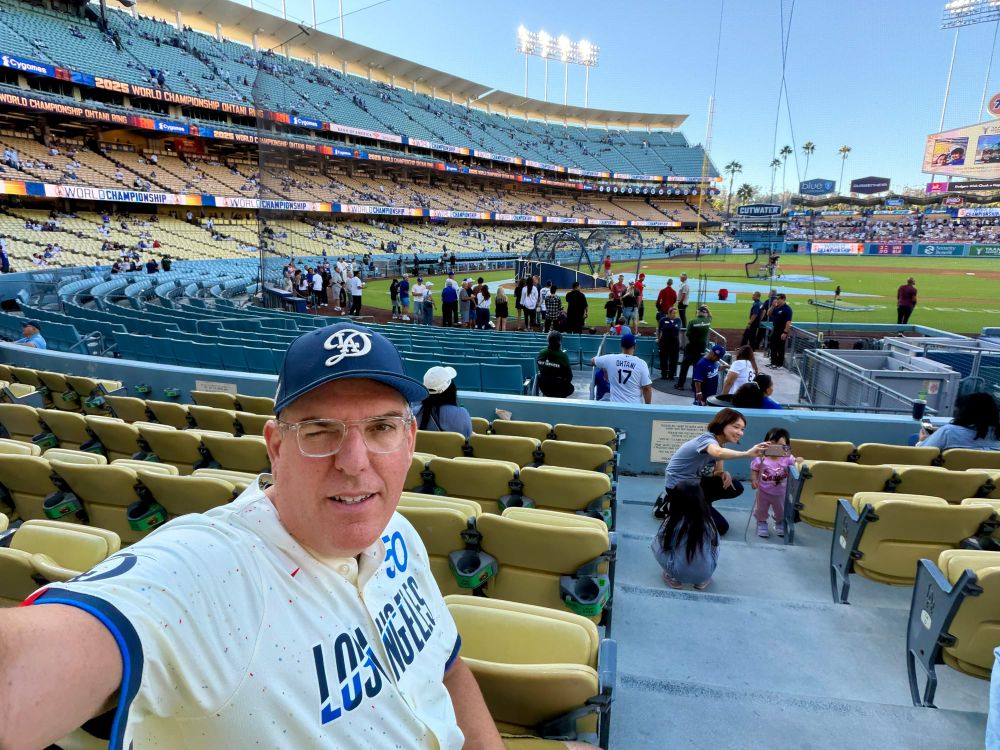
The Dodger Stadium tour is pretty great and if anything, underpriced

Last week I was in LA to get some sun after a dismal cold winter in Oregon. I hung out with my aunt and while she’s been a massive Dodgers fan since she was a kid, in the last couple seasons I’ve followed the Dodgers too so I could keep our daily text chain going. Also, baseball is way easier to watch now that they’ve instituted play clocks. Most nights, the game is over in a couple hours!

I grew up ten minutes from The Big A, where the California Angels play, and the Dodgers were our rivals and my parents never once ever let me set foot in Dodger Stadium. But it looks great on TV and everyone in LA I know loves going to games there so I figured during this off-season, I’d surprise my aunt and swing by so we could check it out together (me, for the very first time).

The tours are kind of buried on their site, and have too many options, but I wanted to get down on the field so I chose the standard tour. To be honest, I didn’t expect much for $30, and quickly reserved a couple spots for the next morning and we drove over to it.

The stadium is in a beautiful spot overlooking downtown LA and though the skies that day weren’t totally clear, it was still a great perch to view the city from (They bulldozed an entire neighborhood for the stadium, which was never mentioned on the tour because it’s still controversial 60 years later). Since it was my first ever visit, I had no idea the stadium arranged all the parking lots at different elevations on the hillside, according to your seat section, so the ballpark itself isn’t surrounded by staircases, you just park at a specific lot on same level as your seats and walk directly in (kinda rad for ADA compliance compared to other stadiums).

We showed up half an hour early and went into the big team store at the top while also enjoying views above the field. Easily, half of the store inventory was dedicated to their biggest new signing of Shohei Ohtani, with tons of shirts and jerseys dedicated to just him. The team store was also filled with people speaking Japanese as he’s a legitimate megastar not just here but also in Japan.

The tour kicked off at its scheduled time and there were maybe 10 people total on our tour with two guides. We walked around the top level for a bit, taking in the view while talking about the history of how the stadium was built and why they moved the team from Brooklyn.

The design language

One thing that jumped out immediately is that the design of all the signage at the stadium is remarkable. They must have thoughtful designers on staff because the whole place uses a couple classic fonts and colors are often muted tones, making the entire ballpark look like a perfectly preserved Southern California 1960s drive-in movie theater. Seeing new painted lettering in faded blue colors just drove the feeling home as if it’s always been that way.

Going backstage

We spent a good deal of time in the middle sections of the stadium, where most of the operations and offices are and could see people scurrying into and out of doors as we stopped to check out memorabilia and walls of photos. They had old travel trunks they used to load with bats for away games and several trophy rooms with all the World Series trophies and golden glove winners on display.

We eventually made it to the press box where the announcers and journalists work at the games, and it was not only a perfect view of the field, it was great to see how they accommodate sports writers, as every seat had what looked like a power strip for laptops and a small air conditioner to keep them comfortable.

Down on the field

After about an hour of visiting several areas inside the stadium, the last 15 minutes of the tour was spent down on the field, and we got to walk in places only players normally go through. We were confined to the warning track around the field and the visitor’s dugout, but it was a remarkable view on a nice sunny day.

Honestly, even if you don’t love baseball or the Dodgers—if you’re ever in LA, I would highly recommend the tour. It was frankly a bargain at $30, as it gave us an hour and a half in a beautiful spot with gorgeous views down to the city and beyond the home run fence. Half our tour group were Australians that didn’t know any of the history of the team or the famous players we saw trophies for, and they seemed to enjoy it as much as I did (I chatted them up, they said American baseball is barely a blip in Oz, as Australian Rules Football and Rugby are king, with NBA basketball and soccer close behind). If you do follow the Dodgers or watch the games on TV, getting to see the place they play up close was a pretty great way to spend a day in LA.

Weather on the Way is the roadtrip app I never knew I needed

I take a lot of road trips, but I never knew Weather on the Way existed until this week and it’s a simple concept. Put in an address for where you’d like to go and the app plots the route using Apple Maps then looks up the weather along the way as well as highlights any road closures or warnings. It even works in CarPlay!

Above you’ll see a screenshot of me putting in Moab, Utah as a destination and it highlights two mountain passes where there are current weather warnings, along with the predicted temps when I arrive at each place.

I’m on a free trial and I’m not sure I’d subscribe to it long-term, but it certainly could come in handy on some long road trips, especially in the planning stages.

Old people hacks: tips for those of us over 40/50/etc

Time keeps marching on as we collectively age, so I thought it’d be helpful to drop a few tips I’ve learned after being on this planet for over 50 years, and using a computer for most of them.

In no particular order, here they are:

Get the largest screen possible, but run a lower resolution

I’ve worn distance-focused glasses since I was a teen, but after I turned 40 my close-up vision began to slowly degrade. I’m not yet to the point of needing bifocals, or even reading glasses, but any time I use my phone, I remove my distance-correcting glasses (my ophthalmologist agrees this is a good fix for now). But this makes working at a desktop monitor a little tricky since it’s not super far away, but not so close I can use it without glasses.

To date, I’ve kept a decade-old pair of glasses on my desk with a lower strength prescription (I ask at eye exams to keep this lower Rx strength as my “computer glasses” option in addition to my main distance correction) and I throw them on whenever I work at a monitor for hours, but last year I made a change for the better and I’ve been enjoying it ever since.

I went from a 27” monitor connected to my desktop Mac to a new 32” monitor, but instead of running it at the default 4K high resolution, I set it a couple steps below so that basically I have all the same screen real estate as I had on my 27″ monitor, but everything is physically larger and easier to read.

If you’re in the market for a laptop, the newest M2 processor powered MacBook Air is great as a fast, light computer that doesn’t cost an arm and a leg. Apple recently added a 15” option next to the existing 13” one and I would strongly recommend anyone older than 30 to buy the 15″ model, but run your screen resolution down a notch or two from the suggested default.

Bonus tip in this same vein: when you edit/read/review/work in Google Docs, change your view to 150% zoom immediately after opening. The first time I was at work and saw someone’s screen with giant fonts, I was taken aback, but after a couple minutes of using it I realized it was so much easier on my eyes and I’ve adopted this ever since.

Use the Reminders app on iOS (or find an android equivalent)

screenshot of my reminders
screenshot of my current Reminders todo, just two things to get done today, but you can see 224 completed tasks over the past few months

As I’ve gotten older, I’ve started to forget a lot of things. Or I have more things on my mind. Or things keep stacking up. You know that feeling when you enter a room in your house and can’t remember why you went into that room?

Whatever it is, these days whenever I think of a rare thing I have to do (example: call up someone for annual maintenance on my house) I just say “hey Siri remind me to call the water quality people for annual well testing” then I can immediately forget about it and go back to doing whatever I was doing, knowing I captured the task and I’ll get to it later without forgetting about it.

I have my ongoing Reminders as a widget on the homescreen of my iPhone (just tap it to load the app and add a new one) and on my mac desktop and on my iPad and they’re all in sync. I don’t sweat that some reminders stick around for days or weeks, as the goal isn’t inbox zero every day but capturing all the pesky things you need to do eventually.

I love the Reminders widget on the upper right of my home screen

The reminders app has been around for years, but it was only since last summer that it became a killer app for me, as I see my list many times each day. Capturing new things easily from my phone or desktop has been a great way to reduce anxiety and not let important things slip through the cracks. Late fees are a thing of the past since I’ve gotten into the habit of using Reminders.

Bonus tip: if I’m driving around and think of something I need to do, Siri over CarPlay will let you record stuff like “hey Siri set a new reminder to schedule an oil change when I get home” and it’ll be in the Reminders app instantly.

Accessibility options in our phones are surprisingly useful

There’s an old saying in the accessibility community that we’re born unable to walk, or talk, and our vision and hearing isn’t so great at first, but most people spend 90% of their lives with increased abilities before they tend to decline near the end. This is a good re-frame of accessibility, because it’s important to everyone—not just those with current limitations. Think about how most people are temporarily fully able only in their best years, therefore software and hardware should accommodate everyone regardless of physical or mental ability.

I use several features in the Accessibility pane of my iOS settings. I have slightly larger fonts set as default and I’m sure as I get older I’ll continue to tweak that to make text easy to read without reading glasses.

I also like to keep my screen very dark at night so as not to wake myself or others up when reading in bed, so I tweak the display settings, turning on “reduce white point” and setting it to a high number like 80%.

I set my action button on my phone to “(smart) invert colors”. This is useful if your phone isn’t on dark mode automatically, or someone sends you a bright white document while you’re in a dark room or you want to play the New York Times Connections game, which lacks any dark mode. Any time I open my phone and think “jeez, this is BRIGHT!” I tap my side action button to invert colors to white text on a black background, making the problem go away instantly.

You can play Connections from the NYT after midnight in bed in dark mode if you add an easy way to “invert colors” on your device

My spouse keeps her phone in silent mode 24/7 and also doesn’t carry it in her pockets (curse the size of pockets in women’s pants!), but often keeps it nearby in bag or on a table. As a result, she sometimes misses urgent texts, until we were out at a restaurant and someone next to us got a bright flashing LED inside their purse whenever they got a new message. We could instantly see the utility of it and opened Accessibility to find the LED Flash for Alerts option to replicate it on her device, and it’s worked wonders since.

Warning: it’s really bright and disruptive, but if you only get a handful of texts each day, it’s a pretty handy option to have turned on when you’re not in front of your phone.


Got any ideas for things that help you that I missed? Reply to me on Mastodon here with your tips!

One more thing about wifi garage doors

For the last ten years, I’ve been a big fan of wifi garage doors because you don’t have to carry an extra key or controller and you can automate things once the garage opens (like turn on lights in your house).

I’ve had Chamberlain/LiftMaster doors for years now in two different houses and though I’ve famously had them hiccup every so often, for the most part they’re reliable and trustworthy and good to have around.

Last month, I noticed my automations where the overhead lights in my garage come on when you open the door stopped working. I chalked it up to a temporary problem at first, but after a week I started double checking my home server and updating every package to make sure it wasn’t my fault. When the lights still didn’t work I checked my logs and found myself cut out of the Chamberlain/LiftMaster API used to control the garage from other devices.

The error said I had issued too many requests, and that I needed to stop for 60-90min and try again. So I did that, shutting down my HOOBs bridge to the API for the night, then reconnected in the morning. Instantly, I got the same errors. Hmm.

I scoured reddit to see if other people were having trouble and found discussions about this exact thing. From reddit I found out the CTO of Chamberlain/LiftMaster published an open letter saying “unauthorized” access to their API was cut off and they were only going to work with paid partnerships.

How things worked before

Chamberlain/LiftMaster garage door openers don’t require the use of a hub on your local network, instead they report up to the cloud where the Chamberlain/LiftMaster API resides. If you use the “My Q” app made by their company, it logs you in with an account, shows you the status of your garage doors and lets you open and close them with a quick tap. It’s not instant, and takes anywhere from 5 to 20 seconds to actually open your door.

Eventually, Chamberlain/LiftMaster built a HomeKit hub to let you talk to your garage doors with the Apple Home app on iPhones and Macs. But then some tinkering nerds figured out they could code up a fake My Q client that logs in as you and checks the door status, offers an open/close button and is also HomeKit-available in a homebridge My Q app.

That homebridge app worked perfectly for years, but I could tell it was a strange app. Whenever I ran analytics on my home network, I’d see requests to the My Q API on the order of two to three thousands of times per day. I believe the code logged in as you and checked your garage door statuses every few seconds. I kind of wish it could have been once every 30 seconds but then there would be a long lag between when you push the button on your phone to open the garage, and automations would be delayed by up to 30 seconds.

I noticed the official My Q app has been launching new monthly fees for integrations between the garage door and other services/apps, so I figured someday they’d probably shut down access to the API.

The solution

Chamberlain/LiftMaster says if you want to continue using Siri to open your doors you should buy their HomeKit hub/add-on box, but they stopped selling it last year so now the remaining boxes fetch up to $300 on eBay (original price was about $60).

I searched YouTube for solutions and saw a few people figured out ways to keep your garage doors on your HomeKit network. One of them kept mentioning a small piece of hardware called a “RATGDO”.

I’d never heard of this so I had to look it up—it’s an acronym that stands for: Rage Against The Garage Door Owners

It’s a bit of code and some simple network hardware you plug into your garage opener. It’s basically a hub that lets your devices check the status of your doors without having to contact the cloud, so you can continue using automations and Siri and opening/closing your doors from your phone.

I don’t know if I’m going to go down the RATGDO route, since it’s a bunch of hardware and wiring and will take up a whole Saturday to get working. For now, I’m going back to the HomeKit hub/box I still have to see if that fixes things back up.

It’s annoying though to have the rug pulled out from everyone using the old software method of interacting, and with no warning it was going to happen. On the one hand, I get that thousands of requests per day from a small percentage of customers could easily be 50% of their entire network traffic, I just wish they gave the authors of the software a way to decrease the frequency instead of blocking everyone. Chamberlain/LiftMaster has a legit reason to believe past customers giving them no new money are costing them money, but then again I may never buy another garage door opener from them again based on how they rolled this out.

Volvo outdid Subaru

Volvo has a new small pure electric compact crossover coming out soon called the EX30, and from early reviews it’s going to be a killer small city EV, about a foot and a half shorter than most crossovers while having similar interior space, and can run for 200-250 miles on a charge. It’s also the cheapest EV Volvo has ever released, starting around $35k in the US and coming out next spring.

Earlier this year Volvo also showed off their “Cross Country” concept version, which is a term Volvo has used for the past couple decades on several of their models that are more rugged, off road-y versions of regular Volvo wagons and crossovers.

The moment I saw it, I thought what a cool car, but I also thought isn’t this what a 2025 Subaru Crosstrek should be, pretty much exactly? A small city car that can handle some dirt and gravel and make the owner feel good doing it. Did Volvo completely outdo Subaru?

A friend of mine is a huge Subaru fan, and has driven their cars almost exclusively since the early 1990s. He asked me the other day where all the Subaru EV options were and I had to admit most Japanese car brands avoided developing EVs ten years ago and are way behind the rest of the world. The only Subaru EV out today is a rebadged Toyota developed by Toyota.

As my friend says, Subaru owners like him are some of the most eco-conscious car owners out there, and he’s now clamoring for a less polluting EV over a gas car, but Subaru has basically no products for him today.

I’m gonna tell him to check out the EX 30 and look for the cross country version next year.

An unexpected Tesla Model 3 review

20 years ago, I joined the Hertz gold program back before Uber/Lyft existed and you had to have a car in almost every American city you flew to. Fast forward to 2023 and I hadn’t regularly rented cars in a decade but recently I grabbed one and forgot how useful they could be, especially during those hours after you check out of a hotel but before your flight home in the early evening when you’d rather not lug bags everywhere on public transit.

This year I noticed Hertz started pitching me their new EV rentals over many emails. So a couple months ago, I was in San Diego and though I’ve spent many weekends there car-free, I rented an EV I always wanted to test drive, in this case, a Polestar 2. It was a pretty good experience since I’d owned two EVs in the past, and it was a well performing, comfy car that was easy to drive. Also, Hertz is smart and charges much less for EV rentals. Typical day rates are around $40, when a gas powered SUV might go for $75-100/day. The cost of maintaining an EV long-term seems much lower and I’m glad to see Hertz passes that savings along. Charging the Polestar was a bit of a challenge, but luckily I found a free city-run Level 2 charger to top it up while we were at a restaurant before heading to the airport to return it.

This past weekend I was in Florida visiting a friend and catching a soccer game, and wanted to drive all over the state while my friend had to work, so I signed up for another EV from Hertz, this time I reserved a Kia EV6, another car I always wanted to drive.

Oh no, it’s a Tesla

I was kind of pissed when I walked to the Hertz garage and didn’t see the Kia, but a recent Tesla Model 3 in my designated spot.

Renting an unfamiliar EV is a goddamned journey.

First I had to figure out how to even “start” the car, which for a Tesla meant pretty much nothing was labeled and you had to get to a failure state before it would nudge you in the correct direction. I spent about 5 minutes trying figure out how to play music from my phone in the car (no CarPlay, booooooo), then I turned on all the autopilot options and figured out hitting the brake and shifting to Drive wouldn’t move the car until I waved a magic Tesla card on a keychain over a specific part of the dash.

Hertz might want to print out a quick start guide for renters, because it was frustrating to spend 10 minutes in a hot car hunting around and trying things and tapping into dozens of menus in order to get the car to go anywhere.

The driving experience

Leaving the airport, I got used to the heavy-feeling brake regen, and got up to speed on the insanity that is Florida freeways. I’ve written about them before but Florida has some of the most poorly designed signage and roads, constantly merging without warning, but the Tesla felt fast and confident, and the radar cruise control was incredible and helped me keep my sanity in the stop-and-go traffic you get every few miles on Florida freeways.

Once I got over 55mph, I engaged Autopilot (this Tesla had full self driving options) and I’m not going to lie, it was magical. A couple years ago I rented a Tesla Model X off the app Turo for a weekend, but it was an early Model X with the first versions of the hardware, and the auto-driving features were only about 70% correct, requiring constant driver intervention.

The latest and greatest Tesla auto driving mode is now about 95% correct, and on longer drives, I only had to nudge the wheel in the correct direction (often in construction zones which are unpredictable) once or twice an hour.

I landed at 5pm and had to drive 30 miles through intense traffic and the autopilot stuff really cut down on stress and the wild driving habits of people cutting in front of me. After just a few hours, I realized the Tesla was surprisingly nimble and practical and in full autopilot mode, felt like being in a quiet private train on tracks leading me exactly where I needed to go.

The charging experience

The next day, I decided to drive an hour south to Miami because I’d never been there and wanted to experience the city and surroundings. I cruised through Little Havana and then checked out the coast and a state park just outside of Key Biscayne, and soon enough the battery was down to 30% charge and I knew I needed to top up before heading back north.

I tapped the supercharger button on dash screen maps, picked a nearby option and followed the directions. The battery began preparing for fast charging automatically. The chargers ended up being a parking lot next to a Wawa gas station, and so I backed into a spot, then learned the Tesla power cords are very short and had to back up until I was nearly touching the supercharger.

The Hertz rental docs didn’t mention anything about how to use Tesla Superchargers, so I connected thinking I’d pay for the juice on the car’s dash screen with my own credit card, but to my surprise it just started fast charging immediately (I guess Hertz foots the bill? I haven’t seen any added charges yet.).

I went into the Wawa, used the restroom, ordered a hot sandwich, grabbed a coke and paid for it all. After about 10 minutes, my sandwich was ready and I returned to the car to chow down. To my surprise, the car was already at 72% charge level. WTF, how was it so fast?! I had to eat quickly and by the time I was done, I was at 85% battery full in about 20 minutes.

I drove around Florida for a couple more days and used other superchargers as needed. They were always wicked fast, easy to find, and got me back on the road in about 15 minutes. Since Tesla owns everything end-to-end, it was a much better experience than the hodgepodge of EV America chargers at the backs of Walmarts I used when I owned a Rivian. The “cost” of Tesla supercharging on the screen was typically only $10-15 a session, which was less than half the price of recharging a Rivian at a Walmart, which usually cost me $30-40/session.

At my last long charge stop before returning it to Hertz, my friend and I watched YouTube recaps of other soccer games we missed on the giant center screen, which made the charge time fly by even faster.

I hate that a chaotic company and the man behind it made something so good

I hate that Teslas don’t come with CarPlay enabled. I hate their stupid CEO/owner. Honestly, I hate that I even need a car in almost every major US city because instead of light rail and frequent buses, the best option is a single occupant EV car rushing down immense freeways.

I hate that the charging experience is a thousand times better than trying to find a Level 3 charger in a non-Tesla EV. I hate that their autopilot is so good it’s freaky. I hate all the little convenient things the car did like come to a complete stop in traffic, but automatically resume from a dead stop when the person in front of me started driving (other EVs I’ve driven require you to tap the gas pedal to resume from a stop). Only a company run by a guy so rich he wouldn’t care about getting fined or sued by transportation agencies would make a car that gives you a gentle beep sound when the traffic light turns green, to remind you to put down the phone you’re reading at a red light to start driving again.

I wish other EVs could be this good. I will never own a Tesla, but I can see the appeal now. It was easy to drive, even easier to recharge, and was quite comfortable and made every other car I’ve driven feel like a relic from a past era of personal travel. Even my late model plugin hybrid Jeep Wrangler might as well be a coal-fired locomotive considering how primitive its systems and features are compared to a new Tesla.

How to visit the Portland Japanese Gardens at peak Fall color

A few years ago, I finished a major project at work and they gave our entire wing of the company a day in October of our own choosing to take off as a reward for the extra hours and long nights. I picked a random Thursday in the middle of October and spent the day hiking around the various parks in Portland.

I hadn’t been to the Portland Japanese Gardens in years, but when I saw I was a five minute walk away from it, I got a ticket and went in. The garden is extremely calm and quiet but I noticed a bit of a commotion at one end of the gardens, and walked towards it.

I turned the corner to see half a dozen photographers with tripods fighting to take photos of a single small tree. I waited off to the side for a bit until a few of them left, reached my long arms in, and took some shots that were some of my favorite ever of any tree with Fall color.

Some quick history

Portland’s Japanese Gardens opened around 1967 and the famous maple tree was planted a year later, and thought to be about 20 years old at the time. In 2012, a photo of the tree in full Fall glory won a photo contest at National Geographic, and apparently it became a hotspot every autumn ever since for local photographers. I had no idea, but the day I visited a few years back was around its peak and it happened to be at the best part of the day when photographers fight over the small space at the base of the tree.

How to replicate a good Fall tree photo in the future there

Weather is variable, and it took me three visits to hit the absolute peak this year. I usually look for mid-to-late October weather reports, figure out when there’s a sunny day in between several days of rain, and start visiting the gardens.

As of 2023, a one day ticket into the gardens is $22, but a year pass of unlimited visits is only $70 for one person or $90 for you and a spouse. I think it’s a bargain and would strongly suggest getting an annual pass.

When you visit, try and get there between 1pm and 3pm, and I strongly suggest going on a weekday when it will be less crowded. They’ve also implemented a 15 minute maximum on the pro photographers hogging the spot, and during peak color someone from the gardens will be standing nearby to remind them to take a break and let others take a photo.

The tree is actually kind of a smallish bush, only about five or six feet tall. You have to sit on the ground, legs crossed apple sauce, to get a low enough angle up into the tree. Around 2pm, the sun will be behind the tree and light up the colors within. The shot above is what it looked like on a slow weekday when I took the photo at the top of this post. I felt lucky as a week or two before, there were half a dozen photographers hogging the space below.

The gardens hit peak Fall color a week or two after most of Portland, I believe because it’s in a weird little shady canyon that doesn’t get much sun. If you are there a week early or late, not to worry, you’ll still get great shots and there will be many Japanese Maple trees showing great color.

Here’s a smattering of photos of Fall color at the Japanese Garden over the past few years I’ve taken.