Announcing Social Comments for Ghost


Most people on the internet hear the term "blog comments" and think ugh (derogatory) so much so that there are t-shirts and pins about how everyone should ignore them outright.
As someone that was around in the early days of blogging, I watched and helped develop how weblog comments were first deployed in various systems (I even created a whole community around them!), so I always felt comments had real value.
Then the problem became: how do you surface the gems from any drive-by noise? In the past, I'd require members to login or even pay a $5 cover fee before anyone could comment, but that really adds friction (back then, it was by design).
Traditional blog comments

In the very first versions of weblog comments, we'd throw a blank form at the end of every post and people could fill it out with their name and comment, but they could impersonate literally anybody and say anything (derogatory). Then we moved to logins and memberships in various systems like blog engines and comment-specific apps, but that adds a ton of friction while also reducing anonymity. There were so many times I wouldn't leave a quick helpful comment if I had to jump through five hoops first.
A problem with the required-logins approach was that social media came along and gobbled up all of the internet's water-cooler talking energy, and quickly felt like the best place to shoot the breeze with others. Whenever I'd see a tweet/toot/skeet that said "hey everyone, go read this thing I wrote on this other site" I'd wish I could interact where I was already reading about it on social media, instead of having to go through the motions to leave a comment somewhere else. It's so much easier to hit reply in whatever app you're already in and tell someone that you liked their piece and wanted to mention some additional info, all without having to mess with logins or other systems.
Personal blogs feel really personal

On a single-author blog like this one, I love to hear feedback from everyone, but having open comments was always a bad choice. Even when I required member signups before comments, someone determined to say shitty things could jump through the hoops and to post their nonsense instantly.
I've tried Wordpress comments, Disqus comments, and eventually Ghost comments but nothing quite worked right or balanced an ease of use for commenters with control for the person hosting them.
When you run a small site like this, it also adds a touch of anxiety to your life. A personal blog is like hosting a dinner party in your living room and the thought of someone leaving a bad comment feels like someone took a dump in the punch bowl in your own home. Thanks to the design of comment systems, unless you block every new comment for review before it's posted, an awful comment can happen at any time and that small worry sucks to live with constantly.
So what's the ideal solution?
Here's what I want out of a dream comment system:
- Let me be selective about feedback and publish helpful things that people say, anything that helps fill out a story, that brings additional context or information or shares some personal experience with a topic
- Let people be as anonymous as they want
- Don't make people sign up for anything to share the comments on your site
- Figure out a way to harness the power of social media, where people are already talking about your stuff, with no extra effort on their part
- Reviewing and choosing the best comments by hand isn't that hard and is worth the effort to make the posts better here
My first stab at Social Comments for Ghost
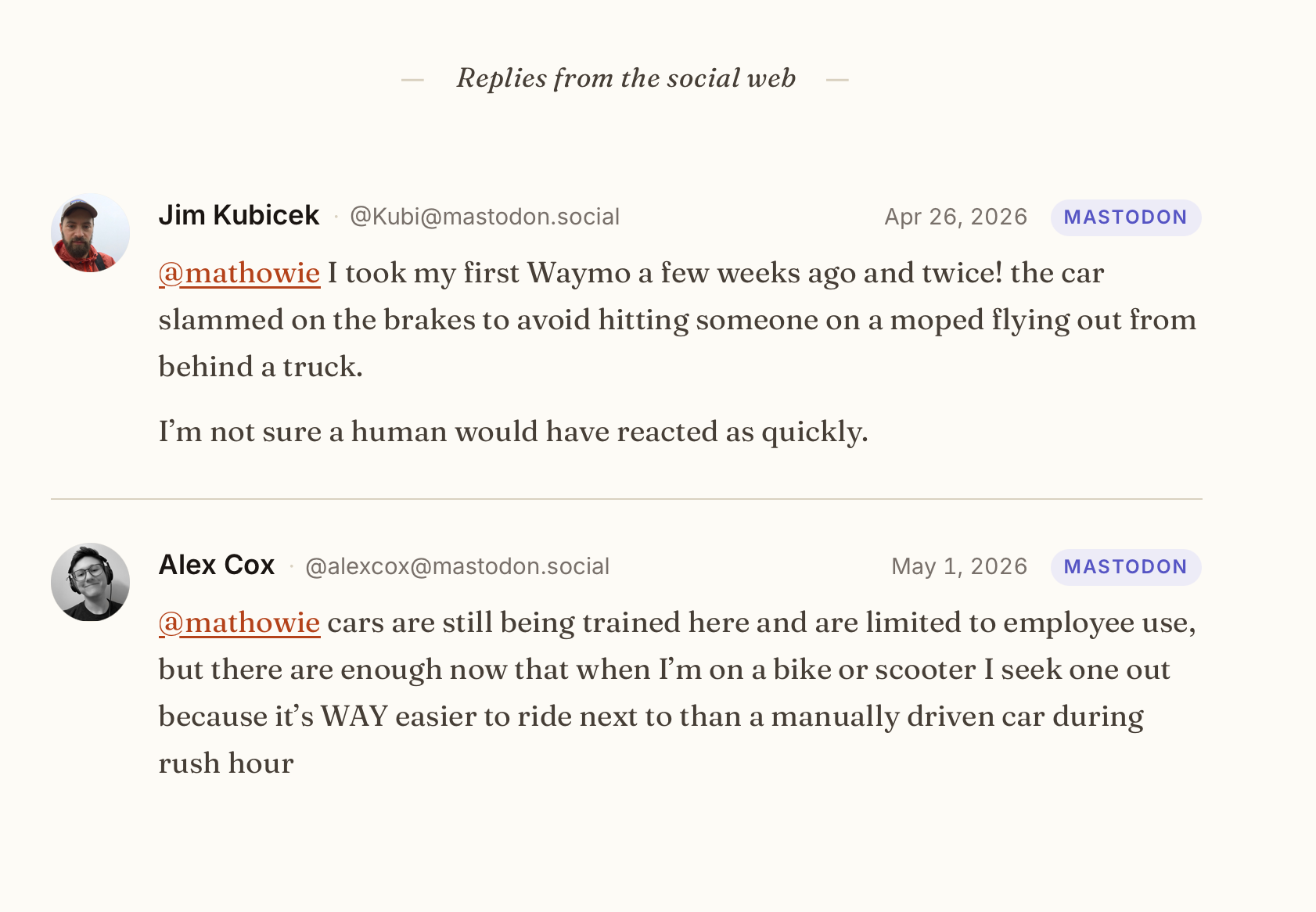
A few weeks ago I implemented it here and it's been great so far. I tend to announce every new post on my Mastodon feed (and that gets mirrored to Bluesky). I check my replies on both sites a couple times a day to see if anyone has any feedback. Whenever people make great points or share something better that worked for them, those kinds of replies are the perfect type of thing I want to pull into my posts, so someone reading it on my site later on gets a fuller picture with the best information.
Prior art
The first place I saw this done well was Kottke.org, where Jason not only gates his comments to just supporting members, but also adds selective mentions from Bluesky and Mastodon into his comment threads and I love how they came out. So this is inspired heavily by seeing that for the first time.
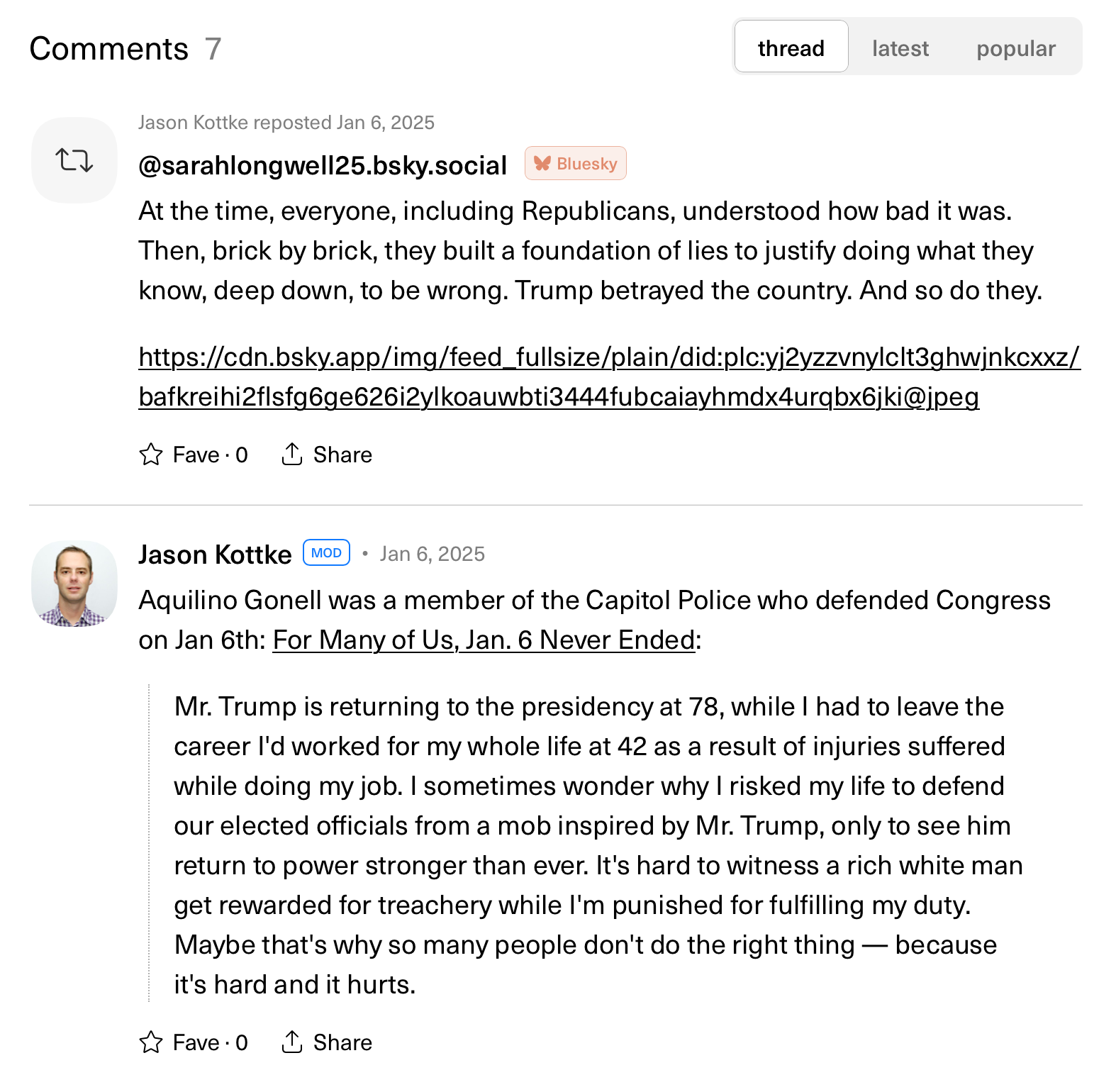
How does it work?
In plain English, it's pretty straightforward.
- I add links to selected outside mentions in a custom field in each post at Ghost
- Some code pulls down those mentions and styles them to match the blog, displaying them much like regular comments on a blog
I add the comments using a simple HTML form stored locally, or in my case, I host it on a server in my house that I can reach from anywhere. It only takes a quick second to copy/paste URLs of mentions I want to share, and I'll eventually try and figure out easier ways to do this (honestly, I wish I could click some magical "super-favorite" button on a social media site that my blog could interpret and import right into a thread on my blog).
Some nitty gritty technical details
For implementation, I use the Code injection feature in a post to toss a list of outside mentions as a JSON blob in the Post footer field. Here's what that looks like in action in my admin view on a recent post.
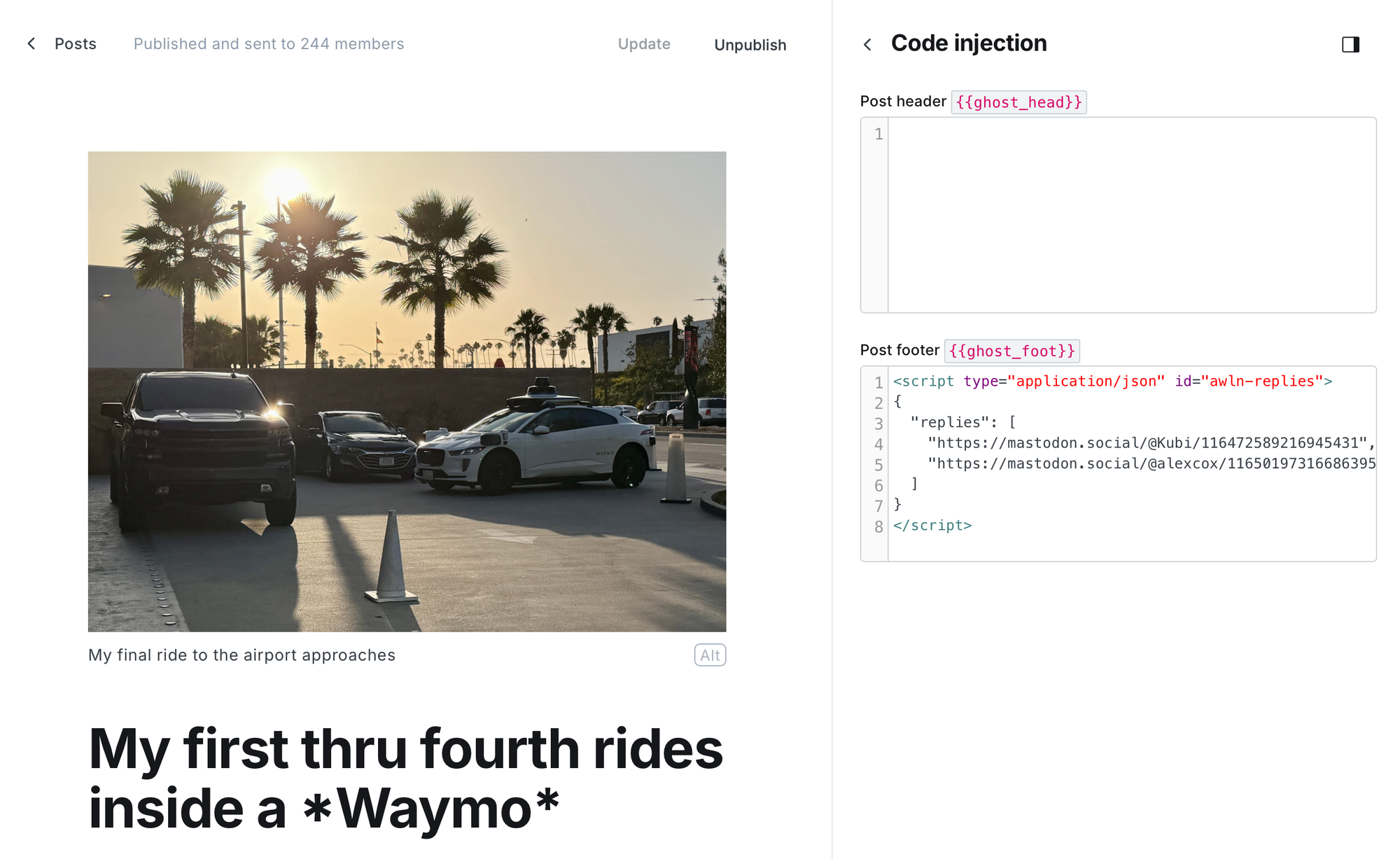
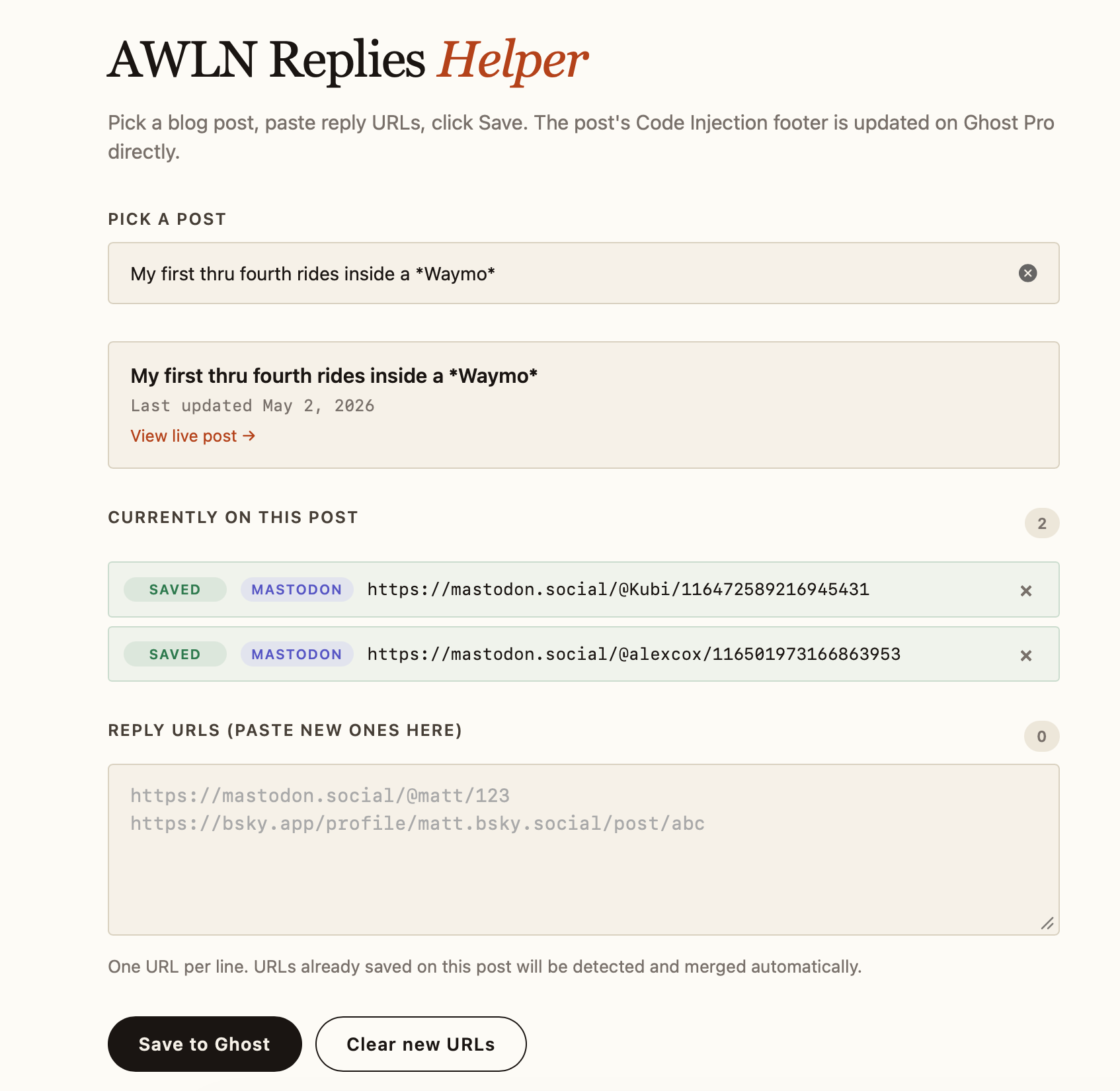
Writing JSON isn't something I do off the top of my head, so I use a custom webpage to add and manage replies, and mine was coded in PHP and runs on my home NAS, where I connect securely to it through Tailscale.
This page stores my custom Ghost app API key and the Ghost URL endpoint, and also lets me pick which post I want to attribute new mentions to. I paste replies as URLs to mastodon or bluesky posts, hit Save to Ghost, and they're on my site. It even works great on my phone when I'm out and about.
Here's what that looks on my end.
Here's the code anyone can use at Ghost
I vibe-coded this with Claude for my own site over the course of a week, but since then I've created a more generic version for any Ghost blog, with the default templates meant to match their free themes. It also includes the self-hosting option for your JSON helper page, you just need a computer running PHP and a quick addition of your API key and URL. You can also run a version locally from a file that creates the JSON blob for you that you'll just paste into Ghost by hand.
 mathowie
Feel free to download it, give it a try on your own ghost blog, and let me know if it worked (or fork it for your own theme and add new features).
I made a test sandbox blog running the Source default theme and it works well. To incorporate the code, I asked Claude Cowork to incorporate the social-comments-ghost Github project into the existing theme and it created new updated theme files that were easy to upload and update instantly.